Live View Drops Cameras After a Few Minutes

Rlinda

New member
I can see all cameras normally when the recorder first boots up, but after a few minutes the cameras disappear from Live View. Rebooting the recorder restores the cameras temporarily, but the issue keeps coming back.
What could be causing this behavior?

 
Hi Rlinda,
This issue is most commonly caused by the recorder running out of processing resources for Live View.
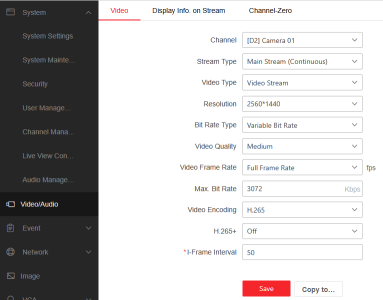
Although a recorder may support high-resolution cameras (such as 8MP), that does not mean it can display all cameras at maximum resolution simultaneously. If multiple cameras are configured at resolutions or bitrates beyond the recorder’s Live View decoding capacity, the system may initially load the streams and then drop them once resources are exhausted.

This can occur when:
  • Camera resolution exceeds what the recorder can decode for Live View
  • Too many cameras are set to high resolutions or high bitrates
  • Live View decoding capability is lower than recording capability
Recommended Solution
  1. Go to Record → Video Parameters on the recorder.
  2. Reduce the resolution and/or bitrate of the cameras.
  3. Apply changes gradually until Live View remains stable.

To determine the maximum supported resolution and number of cameras for Live View, always refer to the recorder’s datasheet, as Live View decoding limits may differ from recording limits.
 
Back
Top