Clipped Footage or Captured an Image in Playback but Can’t Find It?

AlbertCecil

New member
Hello everyone,

I clipped a video segment and captured a snapshot using playback in the Hik-Connect app, but I can’t seem to find where it was saved. Where are these files stored?
Many thanks!
 
Hi AlbertCecil,

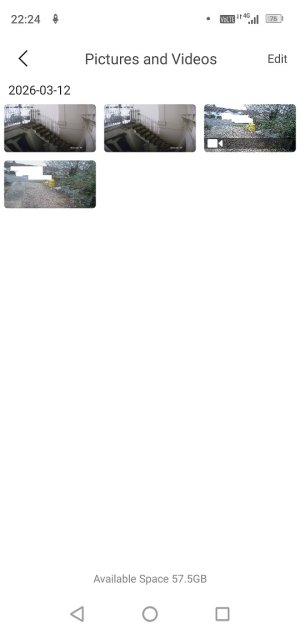
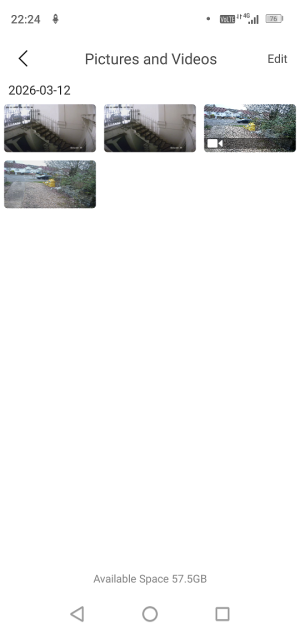
When you clip footage or capture an image in playback using the Hik-Connect, the files are saved locally within the app itself.

To locate them:

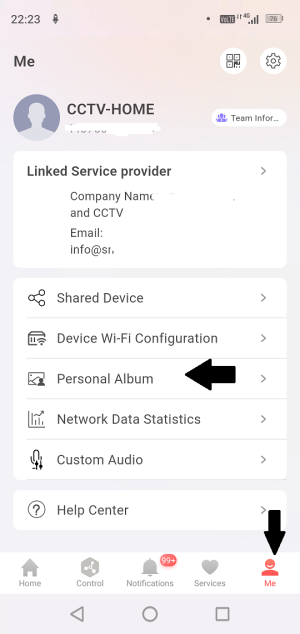
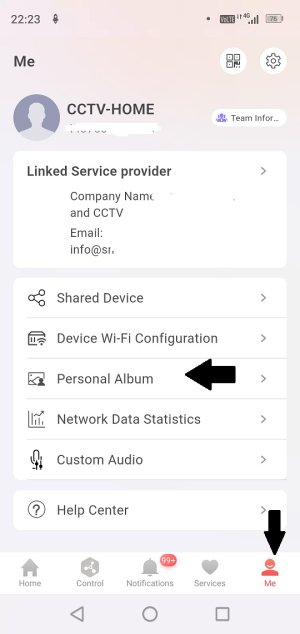
  1. Open the Hik-Connect 6 App.
  2. On the bottom right corner of the screen, click on Me.
  3. Then select Personal Album to access Pictures and Videos.
Hik-Connect saved pics1.jpgHik-Connect saved pics2.jpg
Your saved video clips and snapshots will be stored in this section.

If you still cannot locate the files, ensure that the recording or snapshot process completed successfully and that the app has proper storage permissions enabled on your mobile device.

Please let us know if you need further assistance.
 

Attachments

  • 1773354768220.png
    1773354768220.png
    140.3 KB · Views: 0
  • 1773354914145.png
    1773354914145.png
    176.6 KB · Views: 0
Last edited by a moderator:
Back
Top