KD8003-IME1-S doorbell not ringing but video is displaying.
I have a roughly five year old serial Hik Vision system with KD8003 serial at the front gate and four serial indoor stations.
The serial connection to the Distributor was always flaky and finally gave up completely just before Christmas.
I decided to replace the serial KD8002 gate station with a KD8003-IME1 POE unit and keep everything else.
I got ethernet to the gate location using powerline adapters and a POE switch inside the gate house.
I've configured enough so that video from the new gate station (KD8003) is displaying on both the main indoor station and on our HIK apps on our phones and tablets.
However I can't work out how to make the bell ring on the indoor stations or phones.
The gate lock/unlock also works great on both the main indoor station and on our phones.
The indoor substations are linked to the main indoor station and show up on the main station settings.
All firmware is up to date and IVMS and SADP are up to date.
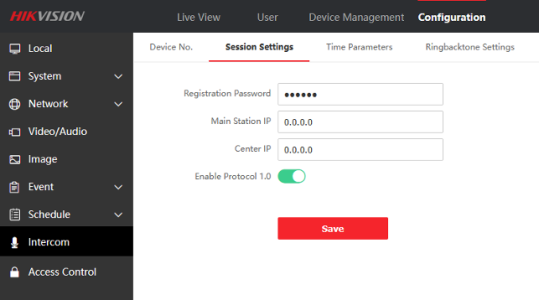
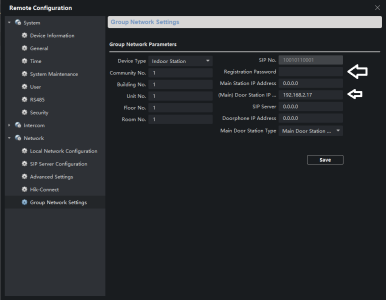
I might not have some SIP settings right, I'm not very familiar with SIP.
Can someone help me please ?
I have a roughly five year old serial Hik Vision system with KD8003 serial at the front gate and four serial indoor stations.
The serial connection to the Distributor was always flaky and finally gave up completely just before Christmas.
I decided to replace the serial KD8002 gate station with a KD8003-IME1 POE unit and keep everything else.
I got ethernet to the gate location using powerline adapters and a POE switch inside the gate house.
I've configured enough so that video from the new gate station (KD8003) is displaying on both the main indoor station and on our HIK apps on our phones and tablets.
However I can't work out how to make the bell ring on the indoor stations or phones.
The gate lock/unlock also works great on both the main indoor station and on our phones.
The indoor substations are linked to the main indoor station and show up on the main station settings.
All firmware is up to date and IVMS and SADP are up to date.
I might not have some SIP settings right, I'm not very familiar with SIP.
Can someone help me please ?