
No audio in playback on Hik-Connect web (MDVR) – Audio works on Android app

soportekoeza

New member
Hello everyone,


I’m having an issue with an MDVR on Hik-Connect.


When I use the Hik-Connect web portal on my laptop, I cannot hear any audio during playback. The video plays correctly, but there is no sound.


However, when I use the Hik-Connect Android app, I can hear the audio perfectly during playback on the same recordings.


Here is what I have already checked:

  • Main stream: Video + Audio enabled
  • Sub stream: Video + Audio enabled
  • “Record Audio” option is enabled
  • MDVR firmware updated to the latest version
  • Live view works fine
  • Playback video works fine (only no audio on web)

So the MDVR is definitely recording audio, because it works on the Android app — just not on the web portal.


Has anyone experienced this issue before?
Is audio playback not supported on the Hik-Connect web version for MDVR?
Could this be a browser limitation or plugin issue?


Any help would be appreciated.
 
Hello everyone,


I’m having an issue with an MDVR on Hik-Connect.


When I use the Hik-Connect web portal on my laptop, I cannot hear any audio during playback. The video plays correctly, but there is no sound.


However, when I use the Hik-Connect Android app, I can hear the audio perfectly during playback on the same recordings.


Here is what I have already checked:

  • Main stream: Video + Audio enabled
  • Sub stream: Video + Audio enabled
  • “Record Audio” option is enabled
  • MDVR firmware updated to the latest version
  • Live view works fine
  • Playback video works fine (only no audio on web)

So the MDVR is definitely recording audio, because it works on the Android app — just not on the web portal.


Has anyone experienced this issue before?
Is audio playback not supported on the Hik-Connect web version for MDVR?
Could this be a browser limitation or plugin issue?


Any help would be appreciated.
Dear member,
Thanks for your question and welcome to the Hikvision Forum.
As long as you can hear the audio on Hik-Connect, you should be able to hear the audio on the browser as well.
This normally related to plugin.
Could you please share the model of the DVR you have and the current firmware version?
Thanks
 
Dear member,
Thanks for your question and welcome to the Hikvision Forum.
As long as you can hear the audio on Hik-Connect, you should be able to hear the audio on the browser as well.
This normally related to plugin.
Could you please share the model of the DVR you have and the current firmware version?
Thanks
Hi yea
The model is AE-MD5043-SD and the firmware version is V5.7.7.576669 build240522
 
Okay.
You said you are using Hik-Connect web version.
Do you mean you are trying to access the MDVR via the web interface (using the IP address) or you are using Hik-Connect Teams 6 mode?
Anyway the audio should work on both ways.
If using the web interface via the IP address, make sure the plugin (or Local Service Components) is installed and running. It should ask if you want to run the plugin when first open the page.
If no message appear check if your pop up blocker is enable.
Try using different browser.
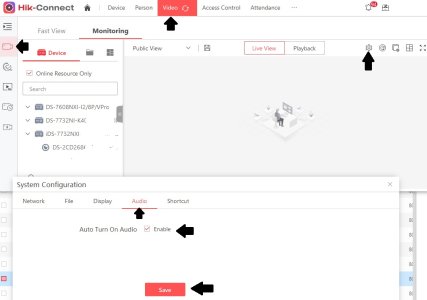
If you are using Hik-Connect Teams 6, make sure that "Auto Turn on Audio" is enabled under Video - Video Security - Configuration.

Audio teams 6.jpg
 
Back
Top